Assisted Digital Access Scheme (ADAS)

About ADAS

Assisted Digital Access Scheme (ADAS) is an initiative of the Ministry of Information Technology Communication and Innovation emanating from the ICT Digital Transformation Blueprint 2025–2029 under Pillar 2, Action 2. The Mauritius Digital Promotion Agency (MDPA) is leading this project with the strategic objectives to impart Basic Digital Skills, Digital Public Services Adoption, and fostering the comprehensive technological inclusion of targeted vulnerable audiences. As Mauritius accelerates its journey toward a fully digital society, ensuring digital inclusion for all citizens is essential. MDPA has established strategic partnerships with the Information and Communication Technologies Authority (ICTA) and Mauritius Post Ltd (MPL) for the nationwide implementation of the project. The agency is implementing the project in structured phases, with key stakeholders joining progressively throughout the rollout.

Project Objectives
  • Service Adoption: To encourage citizens to adopt and utilise digital public services.
  • Capacity Building: To assist citizens in building basic digital skills.
  • Assisted Access: To provide dedicated on-site assistance for using online public services.
Project Beneficiaries
  • Families registered under the Social Registry of Mauritius (SRM): Includes social, food, and income aid beneficiaries.
  • Senior Citizens: Residing in all regions, rural areas, and outer islands.
  • Citizens in vulnerable situations: Includes individuals requiring digital skills assistance following reports via the Maucors+
    platform and Cybercrime Unit.
  • Unemployed Youth (aged 16–29 years): Seeking to build digital foundational competencies for employment.
  • Unemployed Adults (aged 30–50+ years): Needing assistance to re-enter the digital workforce or navigate e-services.
  • Residents in rural, remote areas, and outer islands: With access to limited digital infrastructure or literacy support.
Empowering Citizens with A 15-Hour Modular Curriculum in Digital Literacy, Everyday AI, and Cybersecurity Hygiene

Beneficiaries will undergo a structured free 10-hour practical training program over 4 days. The training content is divided into six modular units designed to build foundational digital skills, promote safe internet usage, and facilitate seamless interaction with online public services.

  • Module 1: Getting Comfortable with Smartphones & Everyday AI (1.5-hour)
    Introduction to basic mobile hardware, touch interface navigation, accessibility settings,standard applications, device maintenance, and basic AI features such as Generative AI systems such as Gemini & ChatGPT.

  • Module 2: Communicating via WhatsApp and Video Calls (1.5-hour)
    Hands-on training on instant messaging, group conversations, audio and video calls, attachment sharing, managing privacy settings, and recognizing
    AI-generated spam or automated messages.
  • Module 3: Managing Email and Digital Notifications (1.5-hour)
    Setting up and navigating personal email accounts, composing and replying to messages, managing attachments, understanding system notifications, and utilising automated email spam filters.
  • Module 4: Accessing E-Government Services & Assisted Portals (2-hour)
    Step-by-step guidance on navigating public sector portals, submitting online applications, accessing government e-services, tracking digital requests, and utilising AI-powered government chatbots/virtual assistants.
  • Module 5: Safe Digital Payments, Financial Literacy & Fraud Prevention (1.5-hour)
    Introduction to digital wallets, mobile banking platforms, secure online bill payments,
    transaction verification, electronic receipts, and recognizing financial fraud or unverified
    payment links.
  • Module 6: Cybersecurity & Privacy(1.5-hour)
    Best practices for robust cybersecurity, creating strong passwords/PINs, securing personal data, recognizing phishing attempts, identifying deepfakes and AI-driven online scams, and reporting incidents via platforms like Maucors+ and the Cybercrime Office.
  • Module 7: AI for Everyday Life (1.5-hour)
    See how everyday tools use AI, asking clear prompts, learn how to write simple questions or requests to get helpful answers, save time on daily tasks, and spot when AI might make mistakes.
Requesting ADAS Training for Your Locality:

If you are interested in scheduling the Basic Digital Skills Support under the Assisted Digital Access Scheme (ADAS) for your locality, Association, NGO, or Registered Home, please reach out to us:

  • Phone: Contact MDPA on 460-2600
  • Email: Send your request to adas@mdpa.mu
  • Group Size: 10 persons
Partner with us:

Join us in empowering vulnerable populations across Mauritius and Rodrigues by supporting this national initiative in the following ways:

  • Mobilise: Mobilise targeted groups within your respective networks and communities.
  • Facilitate: Provide and facilitate suitable venues within the target groups’ localities.
  • Sponsor: Partner as a corporate or institutional for this national digital inclusion initiative.
Project Partners:
Project Sponsors:
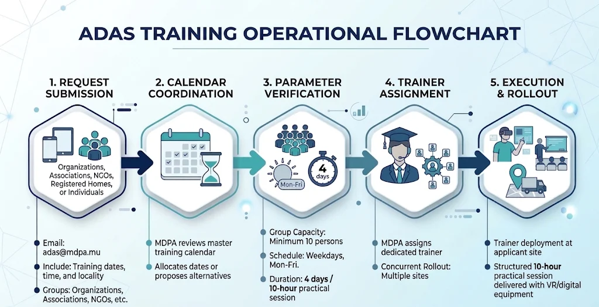
Workflow: Request For Training & Implementation Process
  • Request Submission: Organisations, Associations, NGOs, Registered Homes, or Individuals submit a request for Digital Skills training via email to adas@mdpa.mu with the training dates; time and venue.
  • Minimum Group Capacity: Training sessions require a minimum group size of 10 participants.
  • Training Schedule: Training sessions are conducted on weekdays, from Monday to Friday.
  • Training Duration: Training is delivered over 4 days, covering 15-hour face-to-face sessions.
  • Calendar Coordination: MDPA reviews the request against its training calendar, allocates suitable training dates, or proposes alternative dates in coordination with the requesting party and their proposed locality.
  • Resource Person Allocation: MDPA assigns Digital Support Trainer to conduct 4 days training program.
  • Concurrent Rollout: MDPA has an operational capacity to conduct multiple site trainings simultaneously across different regions.
Alternative Venues for Basic Digital Skills Trainings

Note on Alternative Venues:

 If an applicant does not have a suitable venue, the MDPA may facilitate to utilise any of the following facilities nearest to the applicant’s site:

  • Sugar Industry Labour Welfare Fund (SILWF) Community Centres
  • Social Welfare Centres
  • Youth Centres
  • Day Care Centres
  • Other District Council or Municipal Halls (subject to formal request and availability)


    View more details about the program via this document
Skip to content